Creating Installed Tile off of a Tile Plan in SMS
- Right-click over Tile Plan in the Management Tree
- Click on Create Installed Tile Data
- A new Installed Tile operation will be added to the Management Tree
When 'Create Installed Tile' is not an option
If 'Create Installed Tile' is not an option when right-clicking on Tile Plan, follow the steps below:
- Create a map of the tile data
- Go to File, New, Generic Layer
- Select Generic and click Ok
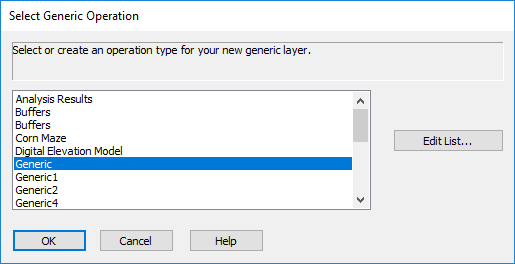
- Click Copy From Layer
- Click Next on the Select Layer screen
- On the Select Layer Objects screen click Select All and then Next
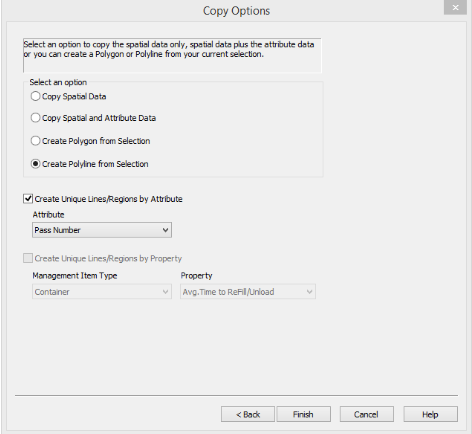
- Select Create Polyline from Selection on the Copy Options screen
- Check the box for Create Unique Lines/Regions by Attribute
- In the Attribute dropdown click on Pass Number and then click Finish
- Click Save. Save it under the correct Grower, Farm, Field and Year. Leave the Operation as Generic
- Close out of the Generic Editor screen once the layer has been saved
- The operation Generic will appear in the tree
- Right-click on Generic and click Create Installed Tile Data
- A new Installed Tile operation will be added to the Management Tree
Editing Installed Tile
- Click on Installed Tile in the tree and click create new map
- Right-click on the map and click on Edit Layer
- In the edit layer screen use select point to select a tile line
- Use the Edit Tile Selection/Run box to edit the settings on the tile line
- Click save when complete
Editing Installed Tile From 3rd party display
- Third Party Displays may export the installed tile data as a Polygon. SMS requires the installed tile to be in Polyline form to properly calculate length and to edit if needed.
- SMS is unable to convert polygon data to polyline. Suggest customer to reach out to the manufacturer of display for assistance.